Captcha
CAPTCHA stands for “Completely Automated Public Turing test to tell Computers and Humans Apart.” It is a security measure designed to distinguish between human users and automated bots on the internet. CAPTCHAs are typically presented as distorted images containing alphanumeric characters or objects that require users to identify and enter the correct information.
The purpose of CAPTCHA is to prevent automated programs, or bots, from performing certain actions that may be harmful or undesirable, such as spamming, brute-force attacks, or unauthorized account access. By requiring users to solve a CAPTCHA, website owners can verify that the user is human and not a malicious bot.
CAPTCHAs often involve tasks that are easy for humans to solve but difficult for computers. Examples include identifying distorted letters or numbers, selecting specific images from a set, or solving simple math problems. This way, humans can pass the test and proceed with their intended actions, while bots are less likely to pass the verification.
Why Use OTP (One-Time-Password) Instead Captcha
We do not recommend to use captcha, use OTP (One-Time Password) flow instead.
OTP is a widely adopted method for user verification in mobile apps for several reasons:
- User Convenience: OTP verification is generally considered user-friendly and convenient. It involves sending a unique code to the user's registered mobile number, which they can enter into the app to verify their identity. This method is straightforward, efficient, and doesn't require users to remember or create complex passwords.
- Mobile Integration: Mobile phones are uniquely suited for OTP verification due to their ability to receive SMS messages or push notifications. This integration allows for seamless delivery of verification codes directly to the user's mobile device.
- Security: OTP verification provides an additional layer of security by requiring a unique code for each login or authentication attempt. Since the code is valid only for a limited time and usage, it mitigates the risk of unauthorized access even if the code is intercepted.
- Accessibility Considerations: OTP verification can be made accessible by offering alternative methods for users who may have difficulty receiving or entering codes via traditional SMS. For instance, apps can provide options for users to receive OTPs via email, voice calls, or other accessible channels.
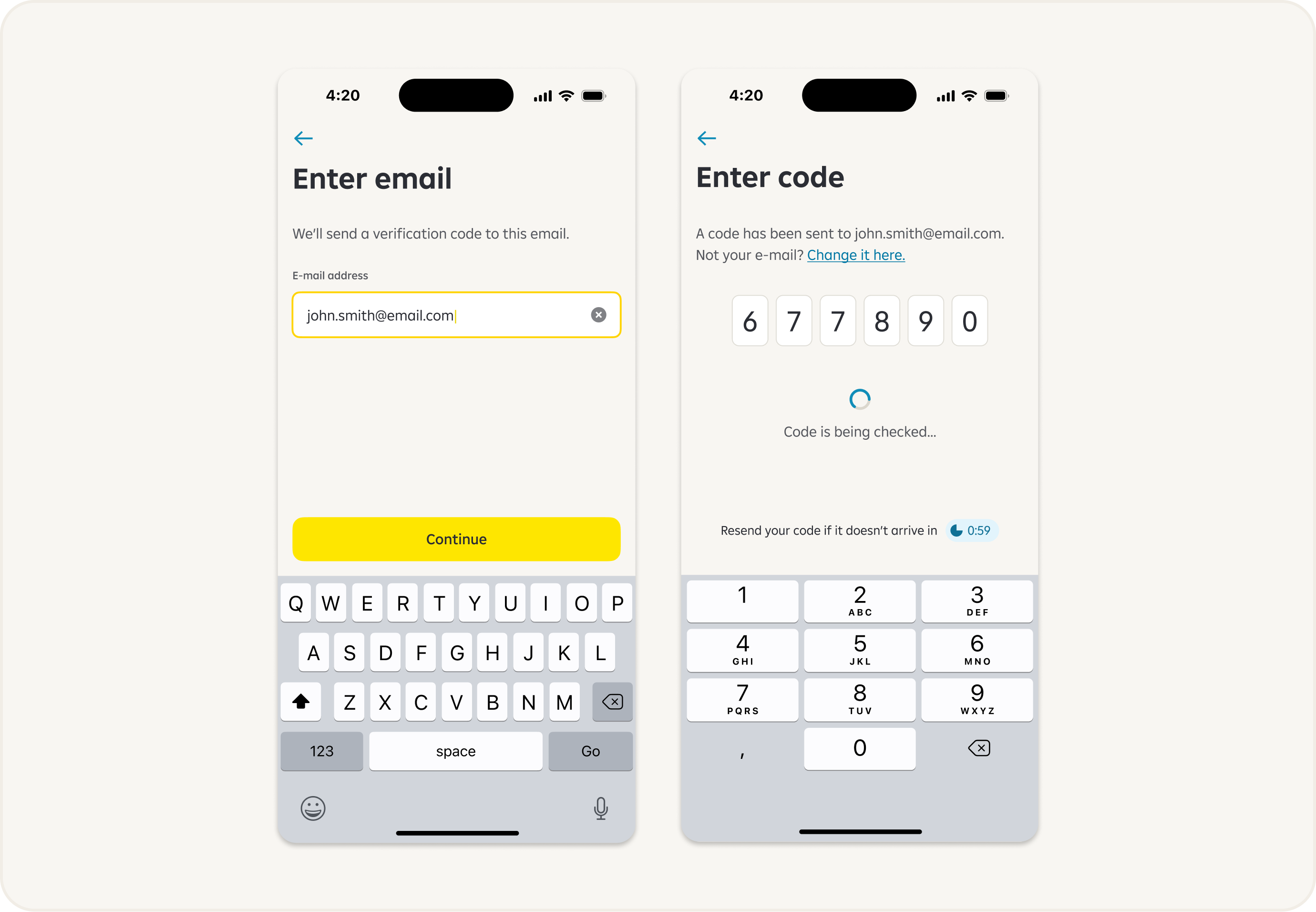
OTP Flow
- Users receive a one-time password via email or SMS for authentication.
- They enter the OTP into the designated field to complete the verification process.
- The system validates the OTP and grants access upon successful verification.
Conclusion
While captchas can still be used in mobile apps, they may need to be carefully designed to ensure accessibility for users with disabilities. Additionally, incorporating OTP verification alongside or instead of captchas can provide a more user-friendly and secure experience for mobile app users. Ultimately, the choice of security measures depends on the specific needs and context of the mobile app in question.